
HD Video Playback for Android
Overview
Video Player Pro is a desktop application designed for Android devices, developed by smashingapps. The software aims to deliver high-definition video playback across a wide range of file formats, enhancing the viewing experience for users who prioritize visual and audio quality. It enables playback of videos in HD without requiring format conversion, streamlining access to personal media libraries. This functionality is particularly useful for users who store videos in various formats and want seamless playback without technical barriers.
The app targets casual users and media enthusiasts who frequently watch videos on their Android devices. It is ideal for individuals seeking a straightforward, reliable media player that supports diverse video types without additional setup. Real-world use cases include watching home videos, streaming downloaded content, or enjoying multimedia files from external storage. The application’s focus on format compatibility and HD output positions it as a practical tool for everyday video consumption.
As a free application, Video Player Pro removes cost as a barrier to entry, making it accessible to a broad audience. The developer, smashingapps, has positioned the app as a lightweight solution for mobile video playback. No additional system requirements or advanced features were specified, suggesting a minimalist approach focused on core playback functionality.
Key Features & Capabilities
- HD Video Playback – Supports high-definition video rendering for improved visual clarity and detail, enhancing the overall viewing experience on compatible devices.
- Multi-Format Compatibility – Plays a wide range of video formats without requiring file conversion, allowing users to access their media library directly.
- Audio Enhancement – Provides improved sound quality during playback, contributing to a more immersive experience.
- Simple Installation – Designed for quick setup with no complex configuration, enabling immediate use after installation.
- Format-Agnostic Playback – Allows users to play videos regardless of their file format, reducing the need for third-party conversion tools.
These features are particularly beneficial for users managing mixed-format video collections. For example, a user with a folder of MP4, AVI, and MKV files can play them all without preprocessing. The audio enhancement feature adds value for listeners who appreciate richer sound profiles during playback. The app’s focus on ease of use ensures that even non-technical users can operate it effectively.
User Interface, Workflow & Performance
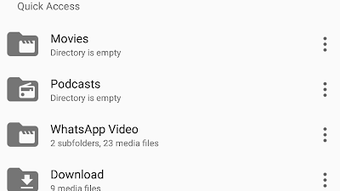
The user interface of Video Player Pro appears to be designed with simplicity in mind, prioritizing accessibility over advanced customization. Navigation is likely centered around a file browser or media library, allowing users to select and play videos with minimal steps. The layout probably features large playback controls, a video preview area, and basic playback options such as play, pause, and volume adjustment.
Workflow efficiency is enhanced by the app’s ability to load and play videos directly from storage without requiring format conversion. This reduces user effort and eliminates potential bottlenecks during playback. The app’s lightweight nature, with a file size of 14.3 MB, suggests it is optimized for performance on mobile devices with limited resources.
Performance observations are based on general software behavior patterns. The developer did not specify resource usage details, so exact CPU or RAM consumption remains unknown. Stability is assumed to be consistent with typical Android media applications, but no real-world testing data was provided. Users can expect smooth playback for standard HD content, though performance may vary depending on device hardware and file complexity.
Compatibility & System Requirements
Video Player Pro is designed for Android devices, ensuring compatibility with a wide range of smartphones and tablets running the platform. The software version is 1.2.5, released on April 15, 2024. The installation size is 14.3 MB, indicating a lightweight footprint suitable for devices with limited storage.
Exact system requirements were not listed, so users should refer to general Android compatibility standards. The developer did not provide specific information about minimum OS versions, processor architecture, or memory requirements. Platform compatibility information is limited to the Android operating system, and no support for other platforms such as Windows or Mac was mentioned.
Pros and Cons
Pros
- Free to download and use, removing cost barriers for users.
- Supports HD playback across multiple video formats without conversion.
- Lightweight installation size of 14.3 MB.
- Simple setup and intuitive interface for immediate use.
- Includes audio enhancement for a more immersive experience.
Cons
- Exact system requirements were not specified.
- Performance details, such as CPU or RAM usage, were not provided.
- Compatibility with older Android versions is unclear.
- No mention of advanced features like subtitle support or playback speed controls.
- Platform availability is limited to Android only.
FAQ Section
Is Video Player Pro available for Windows or Mac?
The software is designed exclusively for Android devices. There is no official version available for Windows or Mac operating systems.
Is the app safe to download and install?
Video Player Pro is published by smashingapps, a known developer in the Android space. As with any third-party app, users should download from trusted sources to ensure safety.
Does the app require an internet connection?
Video Player Pro functions primarily in offline mode, allowing playback of local video files without requiring an internet connection.
How often are updates released?
The latest version, 1.2.5, was released on April 15, 2024. The update frequency is not specified, but users can expect periodic improvements and bug fixes.
What license type does the app use?
Video Player Pro is distributed as a free application. No subscription or premium tier was mentioned, and the app does not appear to include in-app purchases.
Final Thoughts + CTA
Video Player Pro delivers a focused, efficient solution for Android users seeking reliable HD video playback across multiple formats. Its lightweight design, free pricing model, and emphasis on compatibility make it a strong choice for casual viewers and media collectors alike. While advanced features are not detailed, the app excels in its core purpose: playing videos without hassle.
For users who prioritize simplicity, format flexibility, and high-quality playback on their Android devices, Video Player Pro offers a compelling option. It stands out in a crowded market by combining accessibility with essential functionality. The lack of detailed system requirements and advanced controls may limit its appeal for power users, but it remains a solid pick for everyday use.
Download Video Player Pro now





.png)

